

Most teams enable Control Tower controls by clicking through the console.
Someone enables a guardrail during setup. Someone else enables three more during an audit scramble. A year later, the landing zone has 40 controls applied across five OUs, and no one can tell you why any single control is on, who turned it on, or what breaks if it comes off.
The controls work. They deny the actions they are supposed to deny. But the configuration lives in the console, not in a repository, and that means it cannot be reviewed, diffed, rolled back, or reasoned about as a system.
This is the gap between having guardrails and operating them.
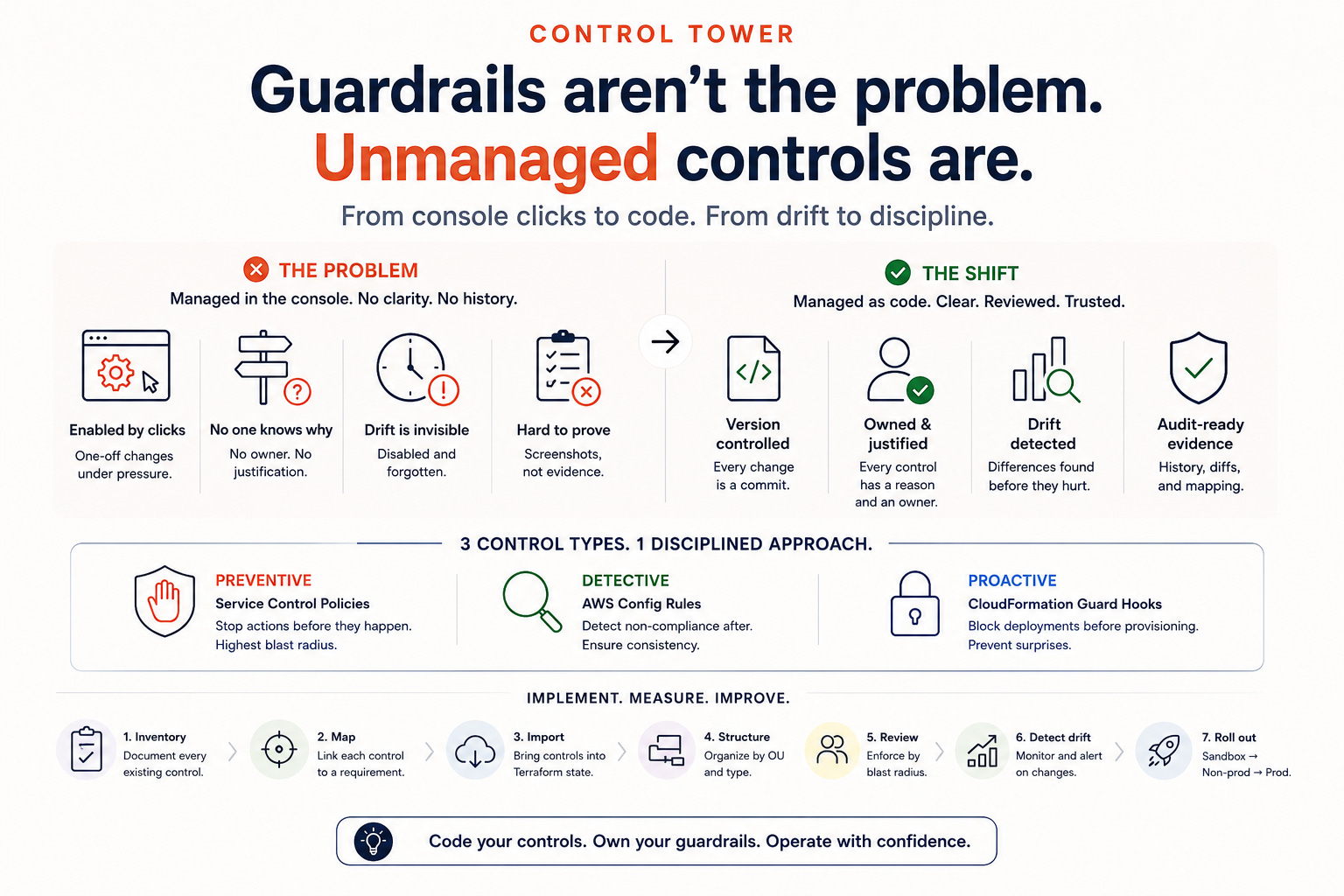
Why Console-Managed Controls Become a Liability
Control Tower controls are the enforcement layer of your landing zone. They are also, for most teams, the least version-controlled part of the entire AWS estate.
The cost shows up at audit time. An auditor asks which controls enforce a given SOC 2 requirement, and the team produces a screenshot instead of a commit. The evidence is a point-in-time snapshot with no history, no author, and no justification.
The cost also shows up during incidents. A deploy fails because a proactive control blocks it. The engineer does not know the control exists, cannot find where it is configured, and cannot tell whether disabling it is safe. The control meant to prevent a mistake now causes an outage in developer velocity instead.
Controls managed by clicking are controls that drift. Someone disables one to unblock a launch and never re-enables it. The guardrail that your compliance posture depends on is now off, and nothing in your system knows.
How Smart Teams End Up Here
No one decides to manage controls by hand. The console path is simply the fastest way to unblock the immediate need.
Control Tower’s own interface encourages it. The landing zone is set up through the console, so the first controls are enabled there. The pattern is set before anyone asks whether it should be code.
Then the team scales. More OUs, more accounts, more frameworks in scope. Each new requirement adds controls, and each addition happens where the last one did: in the console, under deadline, by whoever is closest to the problem.
The team that would never deploy a Lambda function without a repository is managing the enforcement layer of its entire compliance posture with mouse clicks. The inconsistency is invisible because controls feel like configuration rather than infrastructure. They are infrastructure. They deny real actions in real accounts, and they belong under the same discipline as everything else you deploy.
The Three Control Types and How to Manage Each
Control Tower exposes three control types, and the controls-as-code decision varies by type.
Preventive controls are Service Control Policies. They stop an action before it happens: deny disabling CloudTrail, deny resource creation outside approved regions. These are the highest-value controls to manage as code because they are the ones an incident is most likely to touch. Manage them in Terraform against the OU, with the policy body in the repository so the exact denied actions are reviewable.
Detective controls are AWS Config rules. They evaluate resources after creation and flag non-compliance, such as an S3 bucket without encryption or a security group with open ingress. Manage these as code so the rule set is consistent across all accounts, and so that a new framework requirement becomes a pull request, not a console session.
Proactive controls are CloudFormation Guard hooks. They evaluate a resource before provisioning and block deployment if the evaluation fails. These are the controls most likely to surprise a developer, so managing them as code matters most for a different reason: the repository is where an engineer looks to understand why their deployment was blocked.
The axis to weigh is the blast radius against reversibility. A preventive control at the org root has the widest blast radius and the slowest reversal. It gets the most reviews. A detective control in a single sandbox OU has a narrow blast radius and instant reversal. It gets less. Match the review weight to the control’s reach, and do not apply the same ceremony to every control regardless of consequence.
The second axis is framework mapping. Every control should trace to a named requirement. A control that enforces nothing anyone can name is a control that will eventually break a deploy for a reason no one can defend.
Implementation Steps
Deploy controls as code in this order. The sequence matters because early mistakes are the expensive ones.
Inventory the current state first. Before writing any Terraform, export every control currently enabled, the OU it targets, and its type. This is your baseline. You cannot manage as code what you have not first written down.
Map each control to a requirement. For every control in the inventory, name the framework requirement or internal policy it enforces. Controls that map to nothing are candidates for removal, not import.
Import, do not recreate. Bring existing controls into Terraform state using import blocks rather than destroying and recreating them. Recreating a preventive control means there is a window when the guardrail is off. Import avoids the gap.
Structure the repository by OU and type. One module per OU, controls grouped by preventive, detective, and proactive. The structure should allow a reviewer to see all controls for a given OU in one place.
Enforce review by blast radius. Controls at the org root or a production OU require a two-person review. Controls on a sandbox OU can ship with one. Encode this in the pull request rules, not in a wiki no one reads.
Add drift detection. Run a scheduled plan against the control configuration. Any drift between the repository and the deployed state pages the owner. This is the check that catches the disabled-and-forgotten control before an auditor does.
Stage rollout through OU progression. A new control lands on the sandbox OU first, then a non-production OU, then production. Never apply a new preventive control to the org root as its first deployment.
What to Measure
Controls as code is a system, and the system should be measured.
Control coverage. The percentage of enabled controls that exist in the repository versus the console. Track this weekly during migration. The target is 100 percent, and anything managed in the console after migration is a regression.
Drift events per month. The count of times the deployed control state diverged from the repository. A healthy landing zone trends toward zero. Persistent drift signals that someone is still editing controls by hand.
Time-to-evidence for a control question. How long does it take to answer “which controls enforce this requirement” during an audit? With controls as code, this repository query takes minutes to run. An above-an-hour means the framework mapping is incomplete.
Review these in the platform's monthly operating review. Coverage and drift are the two metrics that indicate whether the enforcement layer is under control.
What Changes When Controls Are Code
The landing zone stops being a black box.
Every guardrail has an author, a justification, and a history. The audit question that used to take a day of screenshotting becomes a repository search. The control that blocks a deploy is documented where the engineer already looks. The disabled-and-forgotten guardrail is caught by drift detection within a day, rather than surfacing at the next audit.
The enforcement layer of your compliance posture becomes a system you operate, not a configuration you hope is still correct.
Upgrade If You Need Implementation, Not Just Ideas
If you’re using these emails to guide real decisions on your platform, you’ll get more leverage from the paid version of The Cloud Playbook.
The free newsletter gives you patterns and language.
The paid newsletter turns those patterns into implementation kits you can ship inside a quarter:
Concrete rollout plans (90‑day roadmaps for each pattern)
Templates and checklists (policies, runbooks, tagging schemes, review checklists)
Real examples from high‑stakes AWS environments (what we actually shipped and why)
If the paid side doesn’t save you more than the subscription in one incident, audit cycle, or bad migration you avoid, you should cancel and keep the playbooks.
That’s it for today!
Did you enjoy this newsletter issue?
Share with your friends, colleagues, and your favorite social media platform.
Until next week — Amrut
Get in touch
You can find me on LinkedIn or X.
If you would like to request a reading topic, please feel free to contact me directly via LinkedIn or X.