

Enabling GuardDuty across your organization takes just a few clicks. Making it useful is not.
Most teams do the same thing:
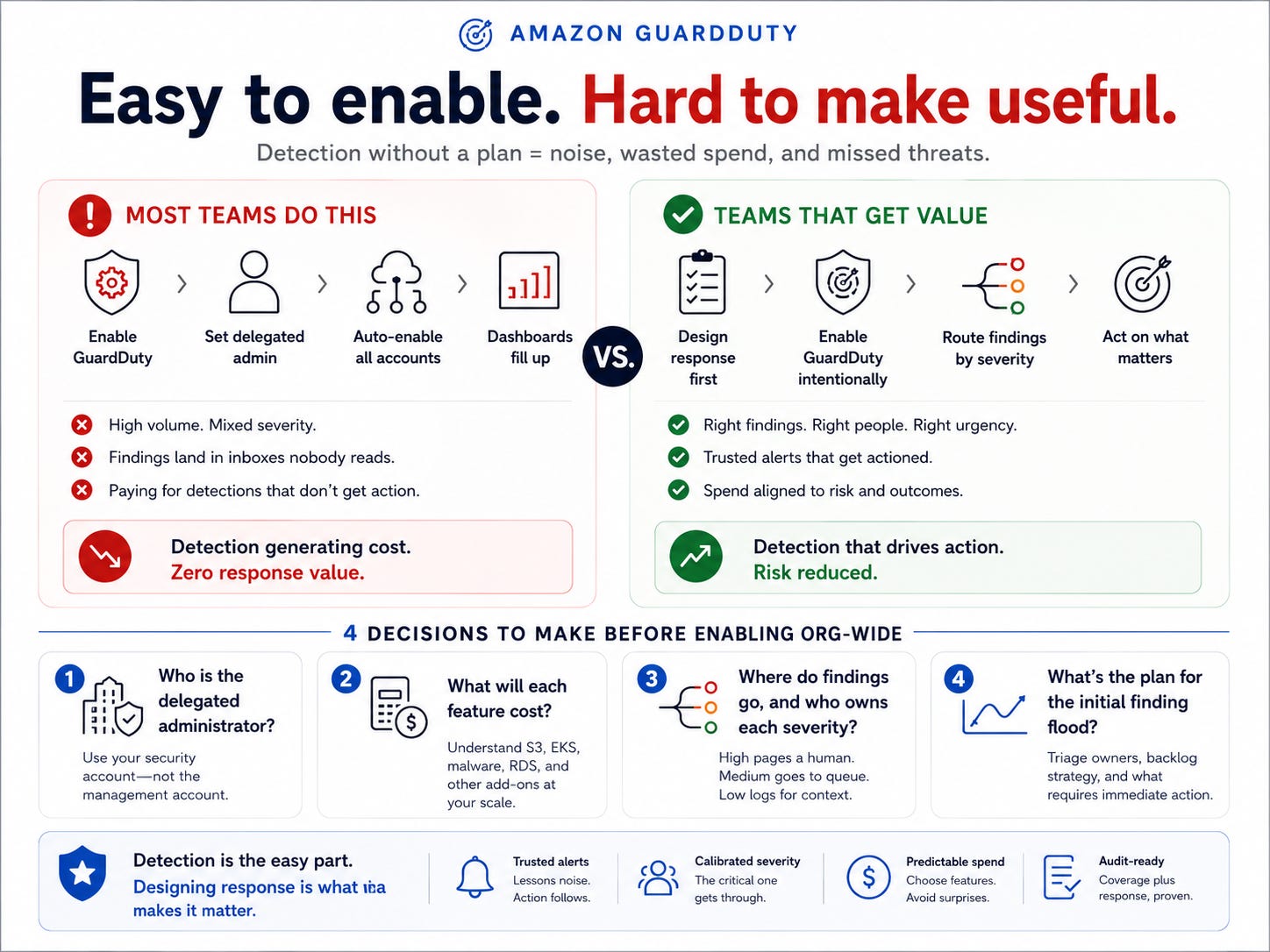
Someone in the security account enables GuardDuty
Delegated admin is set
Auto‑enable is turned on for all member accounts
Now the estate has threat detection “everywhere.” The dashboard fills with findings. Everyone feels safer.
Six months later, those findings land in an inbox nobody reads. The volume is high, the severity is mixed, and nobody has decided who acts on what.
GuardDuty is generating thousands of dollars in value from detection and zero dollars in value from response, because the response side was never designed.
GuardDuty is not the failure. GuardDuty works.
The failure is enabling a detection system without first deciding what happens when it detects something.
Why the “Enable” Click Has a Long Tail
GuardDuty is easy to turn on and expensive to turn on incorrectly. The expense is delayed enough that the connection is easy to miss.
You pay in two currencies:
1. Dollars
GuardDuty pricing scales with the volume of events it analyzes. Volume‑heavy sources like:
S3 data events
EKS audit logs
Malware protection
RDS protection
Can multiply the bill in ways that surprise teams who enabled everything by default. An org‑wide enablement with every feature on, across a large estate, can produce a monthly bill that triggers a finance conversation nobody planned for.
2. Attention (the more damaging one)
A detection system that produces more findings than the team can triage trains the team to ignore them.
The high‑severity finding that matters arrives in the same flood as hundreds of low‑severity informational findings, and it gets missed.
An ignored detection system is worse than no detection system because it creates the appearance of coverage without the substance.
Both costs are set by decisions made before the enable, not after. That makes this a pre‑flight problem.
How Good Teams Still Enable It Wrong
The wrong‑way enable is not negligence. It’s a reasonable response to how the feature presents itself.
GuardDuty’s setup flow makes the easy path the default path:
Enable
Delegate
Auto‑enable for all accounts
Done
The flow does not ask:
Who will read the findings?
What will this cost at your current event volume?
How does a critical finding reach a human with a pager?
It just turns detection on, and that feels like the responsible thing to do.
Security teams are under pressure to show coverage.
“Is GuardDuty enabled?” is a question for an auditor and a customer.
The fastest way to answer “yes” is the one‑click org‑wide enable.
The box measures whether detection is on, not whether the response works.
So detection gets enabled comprehensively, and response is never designed. Findings accumulate. Volume becomes noise. The team that enabled a security control to reduce risk has added an alerting channel that everyone learns to mute.
The gap between “enabled” and “operational” is invisible until an incident falls into it.
Four Decisions to Make Before You Enable Org‑Wide
GuardDuty org‑wide is worth doing. It’s worth doing after four decisions, not before.
Each one determines whether the system produces a signal or noise.
1. Who is the delegated administrator?
GuardDuty findings from every member account aggregate to a delegated administrator account.
That should be your security account, not the management account:
Security tooling lives where the security team operates
The management account stays minimal and boring
Choosing the wrong one is painful to reverse once findings are flowing.
2. What will each feature cost at your scale?
Foundational GuardDuty is one cost. The add‑ons are separate:
S3 protection
EKS audit log monitoring
Malware protection
RDS protection
Each scale with your actual usage patterns.
Before enabling, estimate:
Monthly cost per feature
Against your current log and data volumes
Then enable the features whose value justifies their cost. Not “all of them because they’re available.”
3. Where do findings go, and who owns each severity?
This is the decision that separates signal from noise.
Design this explicitly:
High: pages a human (on‑call rotation/incident channel)
Medium: goes to a queue where someone actually works (ticket system, triage channel)
Low / Informational: logged for forensic use, not alerted
Without this routing, every finding goes to the same destination with the same urgency. The important ones drown.
4. What is your plan for the initial flood?
The moment you enable GuardDuty org‑wide, it surfaces findings for existing conditions. The first days produce a backlog, not a steady state.
Decide in advance:
Who owns triage for the initial flood
How you’ll distinguish pre‑existing conditions from new threats
Which classes of “old but still present” findings will trigger immediate work vs backlog remediation
That keeps the launch from overwhelming the team on day one.
Enabling detection is a five‑minute decision. Designing a response is the actual work.
Do the actual work first.
A detection system is only as valuable as the response it triggers.
What Changes When Response Is Designed First
Teams that make these decisions before enabling get a security control that works, not a dashboard that decorates.
Findings are routed by severity: critical ones go to a human, and informational ones go to a log.
The team trusts alerts because alerts are calibrated, and trusted alerts are acted on.
The monthly bill is a number someone chose, not a surprise that escalates.
When an auditor asks about threat detection, the answer isn’t just “it’s enabled.”
The answer is: “It’s enabled, findings route to these owners at these severities, and here is our mean time to acknowledge a high‑severity finding.”
That’s the difference between a checkbox and a capability.
GuardDuty stops being a system that generates findings nobody reads and becomes a system that generates responses that contain threats.
Detection was always the easy part.
Designing the response before you click enable is what makes the detection matter.
Coming Wednesday for paid subscribers
On Wednesday, paid subscribers get the full system for enabling GuardDuty org‑wide with Terraform, including the gotchas:
Delegated administrator setup
Per‑feature enablement decisions encoded as code
Severity‑based routing and alerting design
Initial‑flood triage plan
The Terraform and org‑structure edge cases that break an org‑wide enable
If you want GuardDuty to be a control your team runs, not a dashboard you ignore, that’s the operating model.
Upgrade If You Need Implementation, Not Just Ideas
If you’re using these emails to guide real decisions on your platform, you’ll get more leverage from the paid version of The Cloud Playbook.
The free newsletter gives you patterns and language.
The paid newsletter turns those patterns into implementation kits you can ship inside a quarter:
Concrete rollout plans (90‑day roadmaps for each pattern)
Templates and checklists (policies, runbooks, tagging schemes, review checklists)
Real examples from high‑stakes AWS environments (what we actually shipped and why)
If the paid side doesn’t save you more than the subscription in one incident, audit cycle, or bad migration you avoid, you should cancel and keep the playbooks.
That’s it for today!
Did you enjoy this newsletter issue?
Share with your friends, colleagues, and your favorite social media platform.
Until next week — Amrut
Get in touch
You can find me on LinkedIn or X.
If you would like to request a topic to read, please feel free to contact me directly via LinkedIn or X.