

Incremental AWS Glue jobs are usually designed for the happy path:
Read new S3 files.
Transform the data.
Write to Amazon Redshift.
Finish successfully.
They run cleanly for months.
Then one fails halfway through the load, and the team discovers it cannot answer a basic question:
Which rows actually made it into Redshift?
That is when an ordinary pipeline failure becomes a data correctness incident.
The problem is not that the job failed.
The problem is that the pipeline has no reliable way to distinguish:
Data that was read
Data that was transformed
Data that reached staging
Data that reached the target table
Data that was committed successfully
A production pipeline must make those states observable and recoverable.
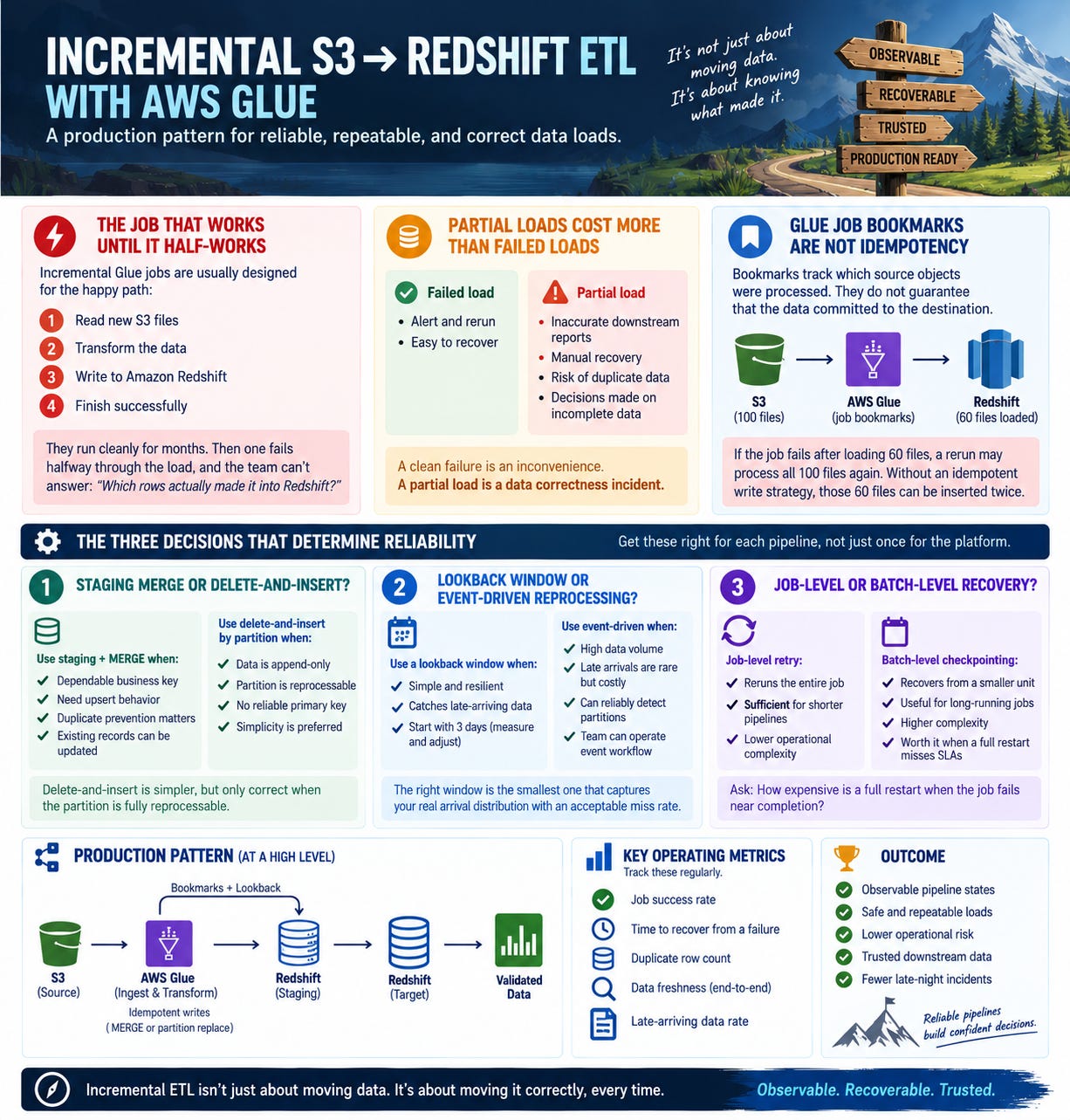
Why Partial Loads Cost More Than Failed Loads
A clean failure is an alert and a rerun.
A partial load is different. Downstream dashboards may show incomplete numbers that still look plausible. Nobody notices until an analyst finds a total that does not reconcile, sometimes days later.
You cannot safely rerun the entire job if some rows already landed. The rerun may duplicate those rows.
The recovery process becomes manual:
Reconstruct which files were processed
Identify which rows reached Redshift
Delete partial data
Rerun a subset
Validate the result under production pressure
The business cost is even higher. Decisions may have been made using incomplete data during the gap.
That cost rarely appears in the incident report.
Why Glue Job Bookmarks Are Not Idempotency
Glue job bookmarks are useful, but they solve a narrower problem than many teams assume.
A bookmark tracks source objects that a job has processed. It is not a record of what was successfully committed to the downstream target.
Imagine a job reads 100 files, writes data from 60 of them to Redshift, and then fails.
The bookmark may remain unadvanced. The rerun reads the 100 files again.
Without an idempotent write strategy, those 60 files can be inserted twice.
The bookmark did not fail.
It tracked source progress. It did not guarantee destination correctness.
Late-arriving data creates a second problem. A file containing yesterday’s records may arrive today. Depending on the source layout and bookmark behavior, the file may be missed, reprocessed, or require a broader partition scan.
You need both:
A mechanism that finds the right source data
A mechanism that makes the destination write safe to repeat
The Three Decisions That Determine Reliability
1. Staging merge or delete-and-insert?
Use a staging table plus MERGE when:
You have a dependable business key
Existing records can be updated
You need exact upsert behavior
Duplicate prevention matters across reruns
Use delete-and-insert by partition when:
The data is append-only
The partition is the natural unit of reprocessing
The entire partition can be rebuilt safely
You do not have a reliable primary key
Delete-and-insert is simpler, but only correct when the partition is fully reprocessable.
If new records arrive incrementally within the same partition, you may need to delete and rebuild the partition. Deleting only the rows seen in the latest run may leave stale or duplicate data behind.
2. Lookback window or event-driven reprocessing?
A lookback window reprocesses the last N days on every run.
This is simple and resilient. It catches late-arriving files without requiring a separate event workflow.
Start with a three-day window only as an operating default, not as a permanent truth. Measure actual arrival delays and resize the window based on evidence.
Use event-driven reprocessing when:
Data volume makes repeated lookbacks expensive
Late arrivals are rare but costly
You can reliably detect affected partitions
The team can operate the additional event workflow
The right window is the smallest one that captures your real arrival distribution with an acceptable miss rate.
3. Job-level or batch-level recovery?
Job-level retry reruns the entire job.
That is usually sufficient for shorter pipelines.
Batch-level checkpointing records progress as the job advances and allows recovery from a smaller unit. It adds complexity, but becomes valuable when a full run takes long enough that restarting from zero threatens the load window.
The decision is economic:
How expensive is a full restart when the job fails near completion?
If the answer is “it causes missed SLAs or creates a backlog,” finer-grained recovery may pay for itself.
The Production Pattern
1. Enable bookmarks and stabilize transformation contexts
Enable Glue job bookmarks, but treat them as source-discovery state, not destination idempotency.
Assign stable transformation context names. Refactoring an unnamed context can change how Glue identifies a transformation and may affect bookmark behavior.
Treat the context name like an interface. Change it deliberately, not incidentally.
2. Truncate staging at the beginning of every run
Write each run into a staging table with:
The same business columns as the target
A batch identifier
Source file metadata
Ingestion timestamp
Generate the batch identifier from the Glue run ID.
Truncate staging at job start, not job end.
If the previous job failed before cleanup, the next run starts from a known state. Cleanup at the end is not enough because failed jobs do not reliably reach the cleanup step.
3. Load staging before touching the target
Do not write directly into the production table.
First load the source data into staging. Then validate it.
Before the target changes, verify:
Expected source objects were found
Staged row count is within tolerance
Required columns are present
Business keys are not unexpectedly duplicated
Transformation errors are below threshold
This separates ingestion failure from target corruption.
4. Merge into Redshift as one transaction
After validation, merge staging into the target within a single transaction.
The transaction should either apply the batch completely or apply none of it.
That converts a partial target write into a clean failure that can be retried.
Make sure the merge key is actually stable. A weak or non-unique key can create updates that look successful while corrupting the target’s logical grain.
5. Apply the lookback in the source query
Use the lookback window in the source predicate, typically against the partition column.
The bookmark and the lookback solve different problems:
The bookmark tracks previously seen source objects.
The lookback checks a bounded historical range for late data.
You need both when files can arrive after their logical event date.
6. Reconcile before committing
Compare source and staged counts before the merge.
At minimum, log and validate:
Source object count
Source row count, if available
Staged row count
Rejected row count
Duplicate-key count
Batch identifier
A nonzero variance should either fail the batch or trigger a defined tolerance rule.
Do not invent tolerance thresholds during an incident.
7. Prevent concurrent runs
Set maximum concurrency to one for pipelines sharing a staging table or target merge path.
Concurrent runs create race conditions around:
Staging truncation
Batch identifiers
Merge order
Late-arriving data
Bookmark state
Retry storms are exactly when these bugs appear. Remove concurrency as a variable unless the pipeline was designed for it.
8. Log the state required for recovery
Emit structured logs containing:
Batch identifier
Glue run ID
Source object count
Staged row count
Target row count
Merge start and end time
Final status
Lookback window used
When someone asks which rows landed, the answer should be one query away.
9. Set the timeout below the load window
Do not rely on the default Glue timeout.
Set the timeout based on the operational window available for the pipeline. A hung job that consumes the entire window can delay every downstream run.
One late load can become a backlog if the pipeline has no recovery margin.
Recovery Runbook
Create a one-page runbook attached to the job alert.
It should classify at least four states:
Failed before staging write
Confirm staging is empty for the batch. Rerun safely.Failed during staging write
Confirm the batch’s staged rows. Truncate staging, then rerun.Failed before merge commit
Confirm the target contains no committed rows for the batch. Rerun after validation.Failed after merge commit
Confirm target state using the batch identifier. Do not blindly rerun. Reconcile first.
The runbook should include queries for:
Batch state
Staged row count
Target row count
Duplicate business keys
Source object list
Late-arriving files
Fill in tolerance thresholds with the data owner before production. Deciding what variance is acceptable during an incident produces bad decisions.
What to Measure
Track these per pipeline:
Merge duration as a percentage of total runtime
Source-to-staging row-count variance
Manual recoveries per month
Late arrivals outside the lookback window
Time from failure alert to confirmed data state
Targets:
Row-count variance: zero unless explicitly explained
Manual recovery: zero
Confirmed data state: under fifteen minutes
Late arrivals outside the window: rare enough to justify the operating cost
Review late-arrival behavior quarterly. Review failures and recovery time monthly.
Build a Load You Do Not Have to Watch
A production pipeline does not eliminate failure.
It makes failure safe, visible, and recoverable.
With bookmarks, staging, idempotent writes, bounded lookbacks, transactional merges, and structured recovery logs, a mid-load failure becomes an alert and a rerun instead of a data investigation.
A pipeline that only works when nothing goes wrong is not a production pipeline.
It is a demo that has not been tested yet.
Take your three highest-volume incremental loads and classify each against the four failure states above.
Any pipeline where you cannot answer which state a failure leaves you in is your first candidate to rebuild.
That’s it for today!
Did you enjoy this newsletter issue?
Share with your friends, colleagues, and your favorite social media platform.
Until next week — Amrut
Get in touch
You can find me on LinkedIn or X.
If you would like to request a topic to read, please feel free to contact me directly via LinkedIn or X.